Can an AI Receptionist Book Appointments? How It Works Step by Step
By Haik Khachatryan, Founder of Revenue Flow AI · Orlando, FL · Updated October 18, 2026
The short answer
Yes. A properly set-up AI receptionist checks your real-time availability, books the appointment on your calendar during the call, confirms the caller's details and sends confirmation and reminder texts. Revenue Flow AI's calendar syncs with Google Calendar, and the slot is confirmed on the call — not after it — so the customer hangs up booked.
Why booking on the call matters
A message is a to-do; a booked appointment is revenue. Every "we'll call you back" gives the customer time to call someone else — in CallRail's 2025 survey, 21% of consumers said they immediately call another business when they can't reach you (source 1). Booking during the call closes that gap.
What it sounds like: a real test call
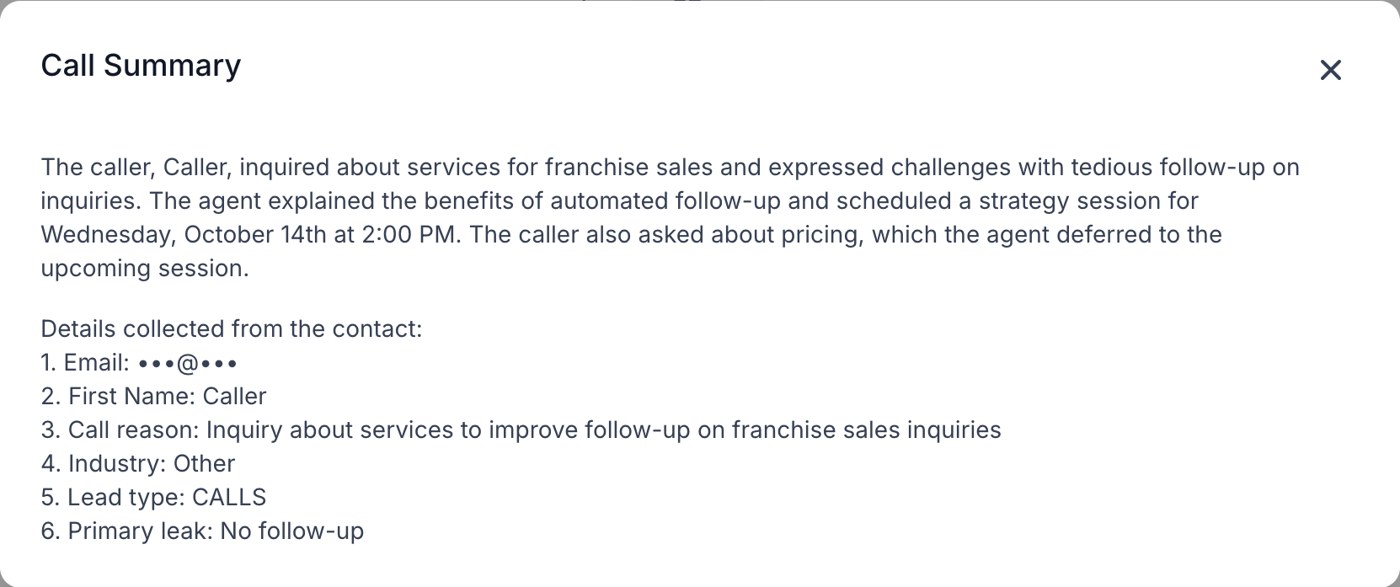
Excerpt from a recorded test call with Ava. The caller (our founder, role-playing a franchise-sales business owner) asks for a time that wasn't offered first. Personal details removed.
Two details matter here: Ava offered specific times instead of asking "when are you free?", and when the caller wanted a different day she checked real availability and offered two new options.
What you get after the call
Every call ends with a written summary and the details the AI collected, saved to the contact in your CRM:
How it works, step by step
- Caller asks for an appointment (or the AI offers one when it's the natural next step).
- AI asks the qualifying questions you choose — service, location, urgency, budget.
- AI checks your live calendar and offers two specific times.
- Caller picks one; it's booked instantly and the details are confirmed back.
- Confirmation goes out by text/email, with reminders before the appointment.
- If the caller isn't ready to book, they go into follow-up so the lead doesn't go cold.
Setup checklist
- Appointment types and lengths (15-minute consult, 60-minute estimate, treatment types).
- Who takes what: which staff, rooms or trucks are bookable for each type.
- Buffers and travel time for field service.
- Rules: what needs approval, a deposit or a human callback.
- Service area so out-of-area callers are handled politely.
- Reminder schedule (for example 24 hours and 2 hours before).
Cutting no-shows
Automatic SMS and email reminders, easy rescheduling links and "reply C to confirm" messages reduce no-shows and give you time to fill gaps. Reminders only go to people who booked and gave their number, with opt-out on every text.
Beyond phone calls
The same booking flow works from website chat, text messages, Google, Facebook and Instagram messages and ad lead forms, so every channel can end in a booked appointment.
Booking rules by industry
| Industry | Typical booking rules |
|---|---|
| Home services (HVAC, plumbing, roofing) | Estimate windows instead of exact times, travel buffers, service-area check, emergency escalation |
| Med spas and clinics | Book by provider and room, consult before treatment, deposits, clinical questions routed to staff |
| Real estate | Buyer vs seller qualification (timeline, area, budget), showing or listing appointment, agent round-robin |
| Professional services | Intake questions first, conflict checks or approvals, 15–30 minute consults |
Common booking problems (and the fixes)
- Double-booking: caused by calendars that aren't synced. Book into one source of truth that syncs with Google Calendar.
- Wrong appointment length: define each appointment type with its real duration and buffer.
- Too many options: offering "any time this week" slows callers down. Offer two specific times.
- Out-of-area bookings: add a service-area question before booking.
- No-shows: send reminders and make rescheduling easy instead of hard.
Frequently asked questions
Which calendars does it work with?
It books into your Revenue Flow calendar, which syncs with Google Calendar, so appointments show up where you already look. Other integrations are set up during the build.
Can callers reschedule or cancel?
Yes, within your rules.
Will it double-book?
No — it books against real availability.
What if the caller isn't ready?
They get follow-up by text and email until they book or opt out.
Sources
Related questions
Missed-Call Text-Back: What It Is, Does It Work, and Where It Falls Short →How Fast Should You Respond to a New Lead? What the Research Actually Says →How Long Does It Take to Set Up an AI Receptionist? (14-Day Timeline) →See it on your own calls
Hear Ava answer, qualify and book a live call
Free demo · Plans from $497/month · AI receptionist live in about 14 days
Book a free demo